*폰트 바꾸기
🌍 Google fonts 의 글꼴을 사용하는 방법
Browse Fonts - Google Fonts
Making the web more beautiful, fast, and open through great typography
fonts.google.com
0. Korean 설정
1. 원하는 글꼴 클릭
2. Regular 400 선택
3. Get font 클릭
4. <> Get embed code 클릭
5. web의 @import를 선택하여 필요한 코드를 복사
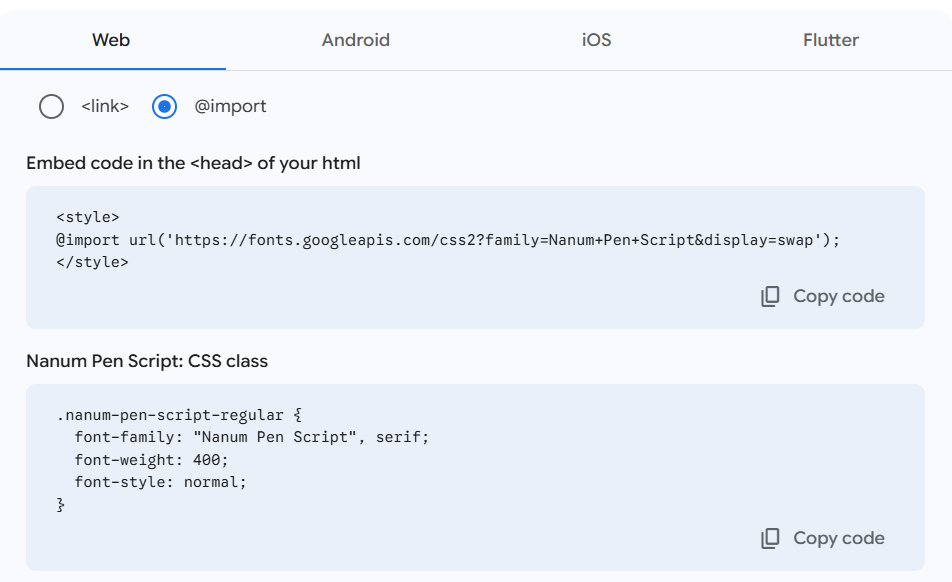
페이지의 코드를 원하는 html 파일에 이렇게 적용하면 된다!
    <style>
        @import url('https://fonts.googleapis.com/css2?family=Nanum+Pen+Script&display=swap');

        * {
            font-family: "Nanum Pen Script", serif;
        }
    </style>
; 각각 폰트를 가져오고, 적용하는 코드
🐤 눈누 사이트의 글꼴을 사용하는 방법
https://noonnu.cc/font_page/pick
눈누
상업용 무료 한글 폰트 사이트
noonnu.cc
1. 원하는 글꼴 선택
2. "웹폰트로 사용" 코드 복사
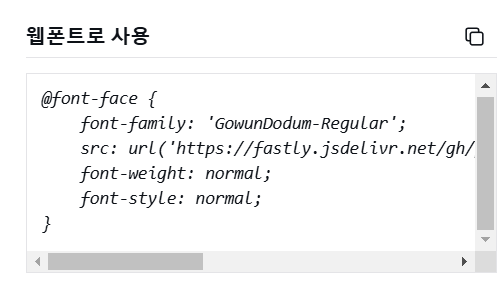
3. 원하는 html 파일의 style에 해당 코드 넣어주고, body도 따로 추가해주기
또는 css 파일에 적어주어도 된다
    <style>
        @font-face {
            font-family: 'GowunDodum';
            src: url('https://fastly.jsdelivr.net/gh/projectnoonnu/noonfonts_2108@1.1/GowunDodum-Regular.woff') format('woff');
            font-weight: normal;
            font-style: normal;
        }

        body {
            font-family: 'GowunDodum', sans-serif;
        }
    </style>
LIST
'👩🏻💻TIL (Today I Learn) > HTML, JS' 카테고리의 다른 글
| 🚀 CORS 보안 정책 : 쿠키 차단 문제의 원인과 해결 방법 (0) | 2025.09.03 |
|---|---|
| 웹의 3요소 (0) | 2025.02.19 |
| 웹 브라우저의 작동 원리 (0) | 2025.02.18 |